
 In the digital labyrinth of healthcare IT, where each data point is a precious commodity and each access point a potential vulnerability, the significance of strong password policies and the imperative of multifactor authentication (MFA) cannot be overstated. Drawing from three decades of experience in the field, I've seen too many security breaches that could have been easily prevented with better password hygiene and authentication protocols. Let's delve into why these elements are critical and outline best practices for creating robust passwords, along with how secure password manager solutions can bolster small healthcare practices.
The Importance of Strong Passwords
Strong passwords act as the first barrier against unauthorized access to sensitive information. They're akin to having a high-quality lock on the door of your practice's digital assets. Weak passwords are easily cracked by automated tools, leaving your patient data exposed to cybercriminals. Moreover, the practice of reusing passwords across different accounts amplifies the risk—once a hacker discovers a password for one account, they can potentially access other accounts, leading to a domino effect of security breaches.
The Necessity of Multi-Factor Authentication (MFA)
MFA adds an additional layer of security by requiring users to provide two or more verification factors to gain access to a digital resource, significantly reducing the risk of unauthorized access. Even if a password is compromised, MFA ensures that attackers can't easily infiltrate your systems. In today's cybersecurity landscape, where phishing attacks and credential theft are rampant, MFA isn't just recommended; it's critical.
10 Best Practices for Strong Password Creation
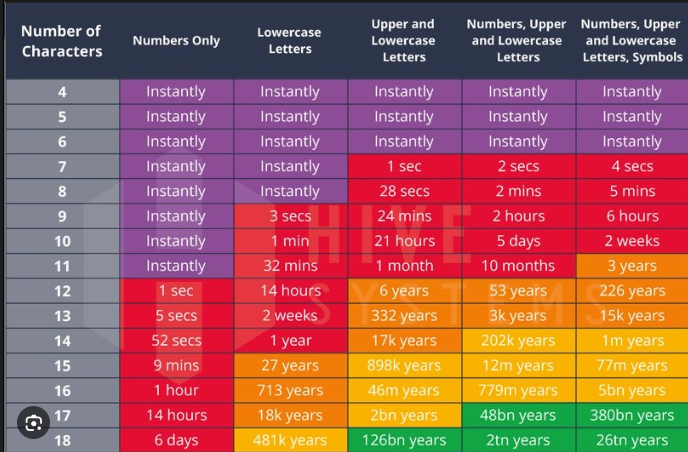
- Length Matters: Aim for passwords that are at least 12 characters long. The longer the password, the harder it is to crack.
- Mix It Up: Use a combination of letters (both uppercase and lowercase), numbers, and symbols.
- Avoid Predictability: Steer clear of easily guessable passwords, such as "password," "123456," or "admin."
- No Personal Information: Don't include information that could be easily found or guessed, like birthdates, anniversaries, or names.
- Unique Passwords for Each Account: Never reuse passwords. If one account is breached, others remain secure.
- Change Regularly, But Not Too Often: Changing passwords too frequently can lead to weaker security practices. Aim for a balance.
- Phrase It: Consider using a passphrase—a sequence of words or a sentence that is easy to remember but hard for others to guess.
- Keyboard Patterns are a No-Go: Avoid sequences or patterns on the keyboard, such as "qwerty" or "1q2w3e4r."
- Use Two-Factor or Multi-Factor Authentication: Wherever possible, enable MFA to add an extra layer of security.
- Educate and Enforce: Ensure that all staff are trained on these best practices and understand the reasons behind them.
How fast can a hacker crack your password ?
How Secure Password Manager Solutions Can Help
For small healthcare practices, managing a myriad of strong, unique passwords across various systems and accounts can be daunting. This is where secure password managers come into play. These solutions store passwords in an encrypted database, generate strong passwords, and autofill credentials across sites and applications. By centralizing password management, they not only simplify the login process but also significantly enhance security, ensuring that best practices are followed without placing additional memory burden on staff.
In conclusion, adopting strong password policies and implementing MFA are foundational steps in safeguarding your healthcare practice's digital frontiers. By embracing these practices and leveraging technology like secure password managers, small healthcare practices can significantly reduce their vulnerability to cyberattacks, ensuring that their patients' data remains secure and their trust intact. Let's make cybersecurity a priority, starting with the basics.

