
Insights from Scorpion Technology
Scorpion-admin
Plain English security tips, IT news, and practical advice for Houston businesses with 5 to 50 employees.
-
Best Practice: How Does Your Password Stack Up?
The suggested ‘rule’ used to be to change your password every three months. With advanced tools like password managers and data encryption, experts now say the…
-
How “Cheaper” IT Providers Sneak In Expensive Hidden Costs
Is your company looking to hire an IT firm? Unfortunately, unless you’re tech-savvy or experienced with IT contracts, there can be hidden costs that you wouldn’…
-
New Security Features To Protect Your Phone In 2024
Long gone are the days when phones were simple devices used to make calls. Today our phones are advanced, handheld supercomputers that can do everything from…
-
5 New Cybersecurity Threats 2024 You Need To Be Very Prepared for
The year of 2023 marked a significant turning point for cyber-attacks with the introduction and wide proliferation of AI (artificial intelligence)…
-
Beware Of Cybersquatters!
Have you ever searched for a specific website but landed on a completely different one after misspelling a letter or two in the URL? This deceptive tactic is…
-
Your 15-Step IT Profitability Road Map For 2024
If you’re hoping to cut costs and boost profitability in 2024 without compromising productivity or efficiency, assessing the technology you use in day-to-day…
-
How IT Support Companies Charge For Their Services, Part 2 Of 2
How IT Support Companies Charge For Their Services, Part 2 Of 2 Continuing on from our previous blog post, we’re answering one of the most common questions we…
-
How IT Support Company Charge for their services Part 1 of 2
How IT Support Companies Charge For Their Services, Part 1 Of 2 Before you can accurately compare the fees, services and deliverables of one IT services…
-
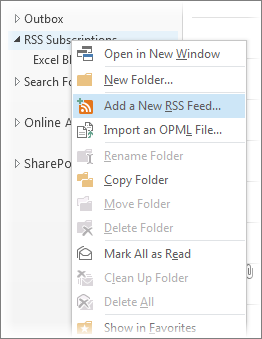
Outlook Productivity Tip #10
Outlook Productivity Tip #10 Last but not least, let’s explore Tip 10, staying informed with RSS Feeds. Subscribe within Outlook to your favorite websites for…
-
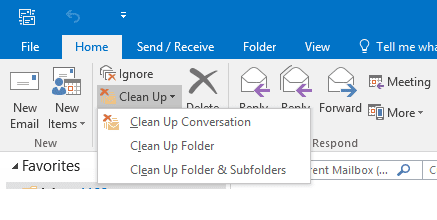
Outlook Productivity Tip #9
Outlook Productivity Tip #9 Tip 9 helps you declutter email threads. Use the ‘Clean Up’ feature to remove redundant messages, keeping your conversations concise.
Not sure where your IT stands?
Grab 30 minutes with our team. We’ll talk through what’s working, what’s not, and where the gaps are. No pitch deck, no pressure.
Prefer the phone? Call 713-623-1266
Got a link that feels off?
Run it through our phishing URL check before anyone on your team clicks.